

Examples
Incoming webhook examples — a one-line curl, tokens, threads, the blocks form, and CI workflow notifications
Ready-to-copy incoming webhook examples. Replace <token> and <secret> in every example with the values you received. Fields and limits are on Incoming Webhooks; the full set of formatting and tokens is in the Message Format Reference.
1. The shortest notification
curl -X POST "https://collabops.ai/api/v2/integration/webhook/<token>" \
  -H "Authorization: Bearer <secret>" \
  -H "Content-Type: application/json" \
  -d '{"text": "**Deployed** `web` 0.4.2"}'
On success you get {"delivery_id": 1234, "deduped": false} back, and a message with bold text and a code chip appears in the channel.
2. Markdown formatting and tokens
For a multi-line body, write it to a file and send it with --data-binary @file to avoid shell quoting trouble. Line breaks inside a JSON string are written \n.
{
  "title": "Login error hotfix deployed",
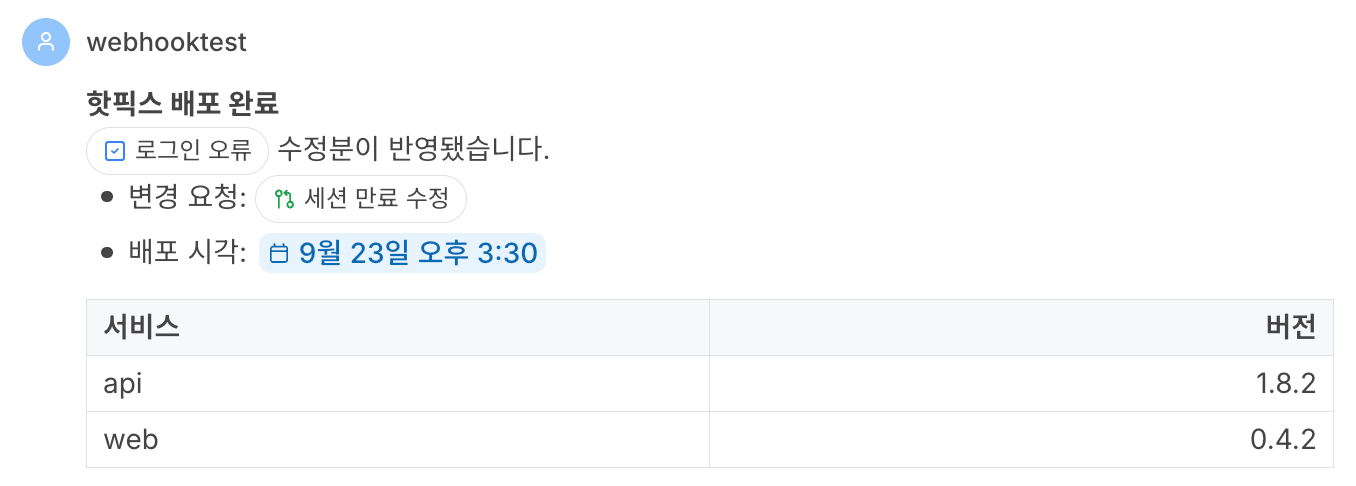
  "text": "**Hotfix deployed**\nThe fix for {{issue:slug=acme|key=42|label=Login error}} is live.\n\n- Change request: {{cr:slug=acme|key=318|label=Fix session expiry}}\n- Deployed at: {{date:iso=2026-09-23T15:30:00+09:00|hasTime=1}}\n\n| Service | Version |\n|:--|--:|\n| api | 1.8.2 |\n| web | 0.4.2 |"
}
curl -X POST "https://collabops.ai/api/v2/integration/webhook/<token>" \
-H "Authorization: Bearer <secret>" \
-H "Content-Type: application/json" \
--data-binary @message.jsontitle is used only as the preview in the channel list and notifications; it does not appear in the body. The issue and change request become chips, and the date becomes a date chip. Chat shows headings (#) as plain text, so the first line uses bold for emphasis.
3. Continuing in a thread
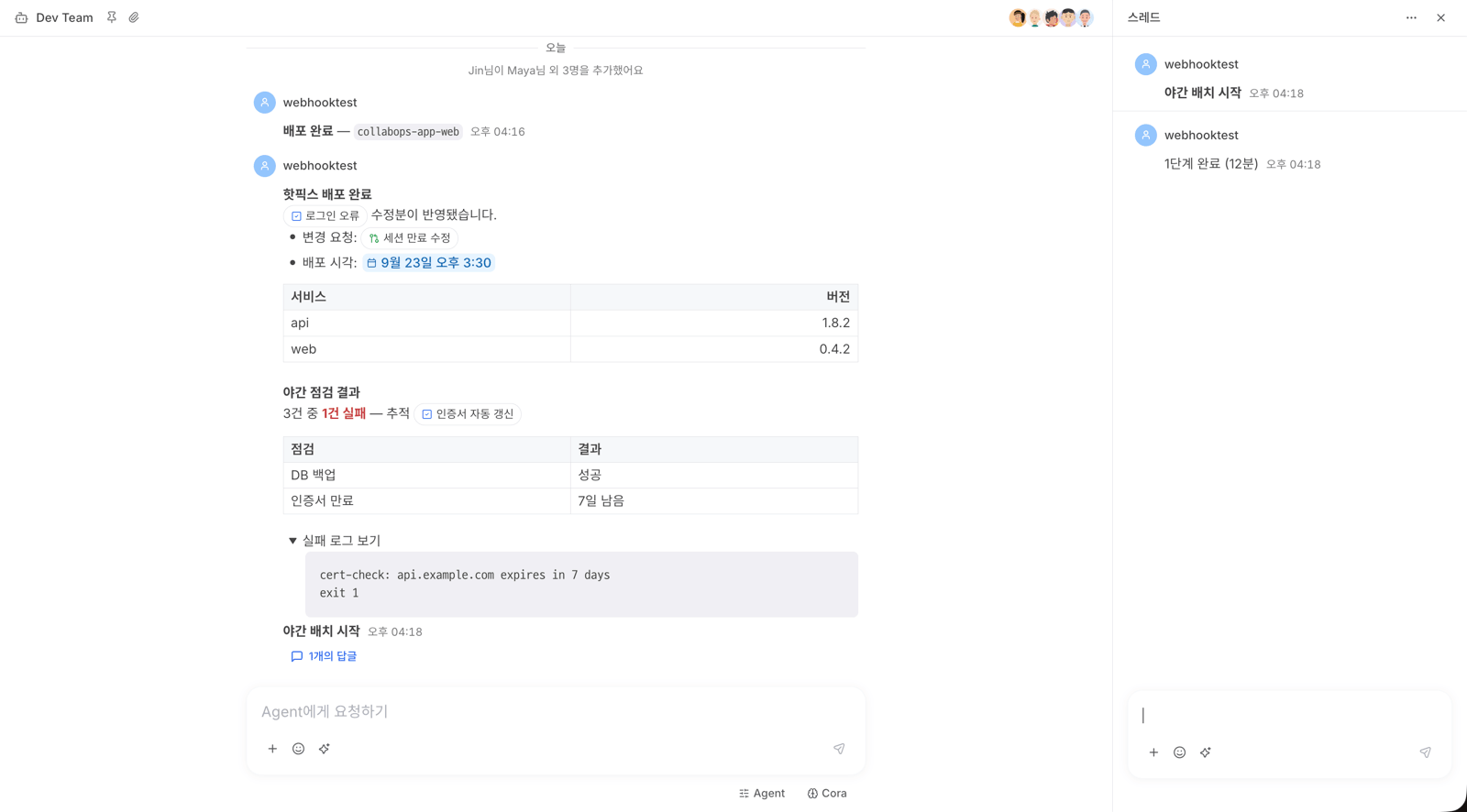
Keep the delivery_id from the first response and pass it as parent_delivery_id in the next request. It is extracted with sed so the script works where jq is not installed.
URL="https://collabops.ai/api/v2/integration/webhook/<token>"
AUTH="Authorization: Bearer <secret>"

# Parent message
RESP=$(curl -sS -X POST "$URL" -H "$AUTH" -H "Content-Type: application/json" \
  -d '{"text": "**Nightly batch started**"}')
PARENT=$(printf '%s' "$RESP" | sed -n 's/.*"delivery_id":\([0-9]*\).*/\1/p')

# Reply, attached to the parent's thread
curl -sS -X POST "$URL" -H "$AUTH" -H "Content-Type: application/json" \
  -d "{\"text\": \"Step 1 done (12 min)\", \"parent_delivery_id\": ${PARENT}}"
Using a reply's delivery_id as parent_delivery_id does not start a new thread; the message joins the same thread.
4. The blocks form — color, table, toggle, issue chip
When you need something Markdown cannot express, send blocks. This example shows check results as a table and folds the failure log inside a toggle.
{
  "blocks": [
    {"id": "title", "type": "paragraph",
     "children": [{"text": "Nightly checks", "marks": [{"type": "bold"}]}]},

    {"id": "summary", "type": "paragraph", "children": [
      {"text": "1 of 3 "},
      {"text": "failed", "marks": [{"type": "bold"}, {"type": "textColor", "attrs": {"color": "red"}}]},
      {"text": " — tracked in "},
      {"type": "embed", "embedType": "entityRef",
       "attrs": {"kind": "issue", "workspaceSlug": "acme", "entityKey": 57, "title": "Auto-renew certificates"}}
    ]},

    {"id": "c00", "type": "tableCell", "attrs": {"tableId": "t1", "rowIdx": 0, "colIdx": 0, "colCount": 2},
     "children": [{"text": "Check"}]},
    {"id": "c01", "type": "tableCell", "attrs": {"tableId": "t1", "rowIdx": 0, "colIdx": 1},
     "children": [{"text": "Result"}]},
    {"id": "c10", "type": "tableCell", "attrs": {"tableId": "t1", "rowIdx": 1, "colIdx": 0},
     "children": [{"text": "DB backup"}]},
    {"id": "c11", "type": "tableCell", "attrs": {"tableId": "t1", "rowIdx": 1, "colIdx": 1},
     "children": [{"text": "Passed", "marks": [{"type": "textColor", "attrs": {"color": "green"}}]}]},
    {"id": "c20", "type": "tableCell", "attrs": {"tableId": "t1", "rowIdx": 2, "colIdx": 0},
     "children": [{"text": "Certificate expiry"}]},
    {"id": "c21", "type": "tableCell", "attrs": {"tableId": "t1", "rowIdx": 2, "colIdx": 1},
     "children": [{"text": "7 days left", "marks": [{"type": "textColor", "attrs": {"color": "red"}}]}]},

    {"id": "log", "type": "toggle", "children": [{"text": "Show failure log"}]},
    {"id": "log-body", "parentId": "log", "type": "codeBlock", "attrs": {"language": "text"},
     "children": [{"text": "cert-check: api.example.com expires in 7 days\nexit 1"}]}
  ]
}
curl -X POST "https://collabops.ai/api/v2/integration/webhook/<token>" \
-H "Authorization: Bearer <secret>" \
-H "Content-Type: application/json" \
--data-binary @nightly.json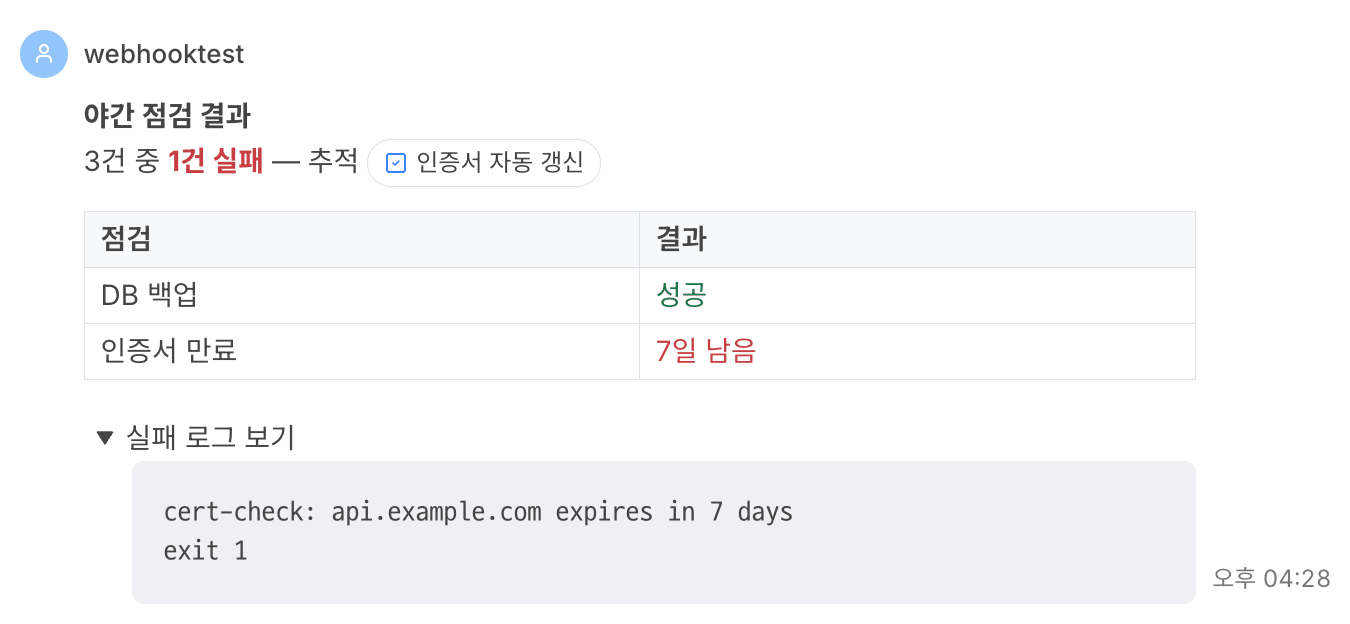
Key points
Each table cell is one block. This table has 6 cells including the header, so the table alone is 6 blocks and the message is 10.
colCount goes only on the first cell of the table (rowIdx: 0, colIdx: 0).
Table cells are colored with a textColor mark on the text inside the cell, not with the cell's attrs. Block-level attrs colors are not painted in chat.
Blocks inside the toggle point to its id with parentId and come right after the toggle in the array. The toggle is posted collapsed and expands on click.
If any block breaks the spec, the whole message is rejected with 422 and error.title names the block index.
5. Success and failure notifications from a CI workflow
Put separate success and failure notification jobs after the deploy job. Notifications are secondary, so the pipeline must still finish green when a notification request fails. That is why a curl failure is caught with || HTTP_CODE="000" and only the response code is logged.
name: deploy

triggers:
  push:
    branches: [main]

jobs:
  deploy:
    steps:
      - name: deploy
        run: ./scripts/deploy.sh               # your actual deploy command

  # ─────────────────────────────────────────
  # Success notification — only when deploy succeeds
  # ─────────────────────────────────────────
  notify-success:
    needs: [deploy]
    if: "success()"
    steps:
      - name: notify
        image: curlimages/curl:8.17.0          # a small image that only needs curl
        env:
          # the URL and the secret are different values; store each in the secret store
          COLLABOPS_WEBHOOK_URL: ${{ secrets.COLLABOPS_WEBHOOK_URL }}
          COLLABOPS_WEBHOOK_SECRET: ${{ secrets.COLLABOPS_WEBHOOK_SECRET }}
          REF_NAME: ${{ collabops.ref_name }}
          COMMIT_SHA: ${{ collabops.sha }}
          COMMIT_MESSAGE: ${{ collabops.commit_message }}
          ACTOR: ${{ collabops.actor }}
        run: |
          # escape backslashes and double quotes before putting a value in a JSON string
          esc() { printf '%s' "$1" | sed -e 's/\\/\\\\/g' -e 's/"/\\"/g'; }

          TITLE=$(esc "$(printf '%s\n' "$COMMIT_MESSAGE" | head -1)")   # first line of the commit message only
          SHORT_SHA=$(printf '%s' "$COMMIT_SHA" | cut -c1-8)

          BODY=$(printf '{"text": "✅ **Deploy succeeded** `%s` `%s`\\n%s\\nby %s"}' \
            "$REF_NAME" "$SHORT_SHA" "$TITLE" "$(esc "$ACTOR")")

          # a failed notification must not fail the pipeline; just log the response code
          HTTP_CODE=$(curl -sS -o /tmp/webhook-resp -w '%{http_code}' -X POST \
            -H "Authorization: Bearer ${COLLABOPS_WEBHOOK_SECRET}" \
            -H 'Content-Type: application/json' \
            -H "Idempotency-Key: deploy-${SHORT_SHA}-success" \
            --data "$BODY" \
            "${COLLABOPS_WEBHOOK_URL}") || HTTP_CODE="000"
          echo "webhook http=${HTTP_CODE} $(cat /tmp/webhook-resp 2>/dev/null)"

  # ─────────────────────────────────────────
  # Failure notification — only when deploy fails
  # ─────────────────────────────────────────
  notify-failure:
    needs: [deploy]
    if: "failure()"
    steps:
      - name: notify
        image: curlimages/curl:8.17.0
        env:
          COLLABOPS_WEBHOOK_URL: ${{ secrets.COLLABOPS_WEBHOOK_URL }}
          COLLABOPS_WEBHOOK_SECRET: ${{ secrets.COLLABOPS_WEBHOOK_SECRET }}
          REF_NAME: ${{ collabops.ref_name }}
          COMMIT_SHA: ${{ collabops.sha }}
        run: |
          SHORT_SHA=$(printf '%s' "$COMMIT_SHA" | cut -c1-8)
          BODY=$(printf '{"text": "❌ **Deploy failed** `%s` `%s`\\nCheck the run log."}' \
            "$REF_NAME" "$SHORT_SHA")
          HTTP_CODE=$(curl -sS -o /tmp/webhook-resp -w '%{http_code}' -X POST \
            -H "Authorization: Bearer ${COLLABOPS_WEBHOOK_SECRET}" \
            -H 'Content-Type: application/json' \
            -H "Idempotency-Key: deploy-${SHORT_SHA}-failure" \
            --data "$BODY" \
            "${COLLABOPS_WEBHOOK_URL}") || HTTP_CODE="000"
          echo "webhook http=${HTTP_CODE} $(cat /tmp/webhook-resp 2>/dev/null)"
Execution flow
deploy
  ├── success → notify-success  (✅ deploy succeeded)
  └── failure → notify-failure  (❌ deploy failed)

If the notification request fails → only http=000 or 4xx is logged, and the job still succeeds
Key points
Store the URL and the secret separately in the secret store and read them with ${{ secrets.… }}. Never write the values in the workflow file.
Values that may contain quotes or backslashes, such as commit messages, are escaped with esc before going into the JSON. Without escaping, the body stops being valid JSON and returns 422.
With the commit SHA and the outcome in Idempotency-Key, re-running the job does not post the same notification twice.
See Workflow Syntax for workflow syntax and Expressions for conditions.
6. Checking the response code
To act on the result in a script, capture the status code separately with -w '%{http_code}'. Anything other than 202 carries the reason in the body's error.title.
CODE=$(curl -sS -o resp.json -w '%{http_code}' -X POST "$URL" \
  -H "$AUTH" -H "Content-Type: application/json" \
  -d '{"text": "Checks done", "status": "ok"}')
echo "$CODE"; cat resp.json
# 422
# {"error":{"code":"VALIDATION_ERROR","title":"요청 형식이 올바르지 않습니다: extra_forbidden at status", …}}
The unaccepted field (status) caused the 422. The text form accepts only text · title · parent_delivery_id.