

Incoming Webhooks
Post messages to a channel from external tools with a single HTTP request — request format, responses, errors, limits, threads
An incoming webhook is an address that lets external tools such as CI pipelines, monitoring tools, and in-house scripts post a message to a channel with a single HTTP request. This page covers how to send a request, what comes back, and what is limited. The formatting and tokens you can use in the body are in the Message Format Reference, and ready-to-copy samples are in Examples. To let a tool read the channel with the same URL and secret, see Reading a Channel.
Creating a webhook
A channel admin creates webhooks from the channel screen. A channel can have several webhooks, so creating one per tool lets you tell at a glance which tool sent a message.
- Open Channel settings from the channel menu to bring up Edit channel. Click Webhooks at the bottom to open Manage webhooks.
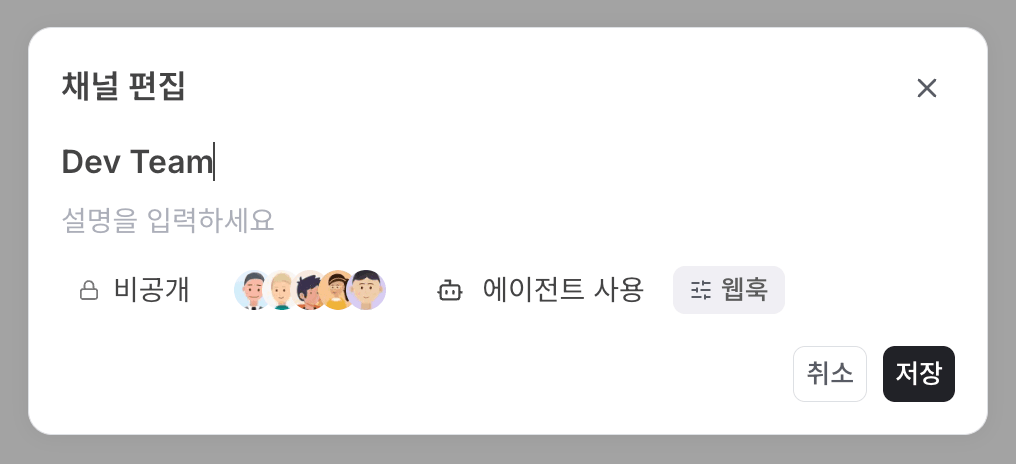
-
Click + Create and enter the name to show in the channel under Webhook profile. Names must be unique within the channel. The profile image is optional. Messages are posted under this name and image.
-
If the tool also needs to read this channel, turn on Allow reading channel messages. It is off by default. When it is on, the same URL and secret can read the channel. You can change it after creation too.
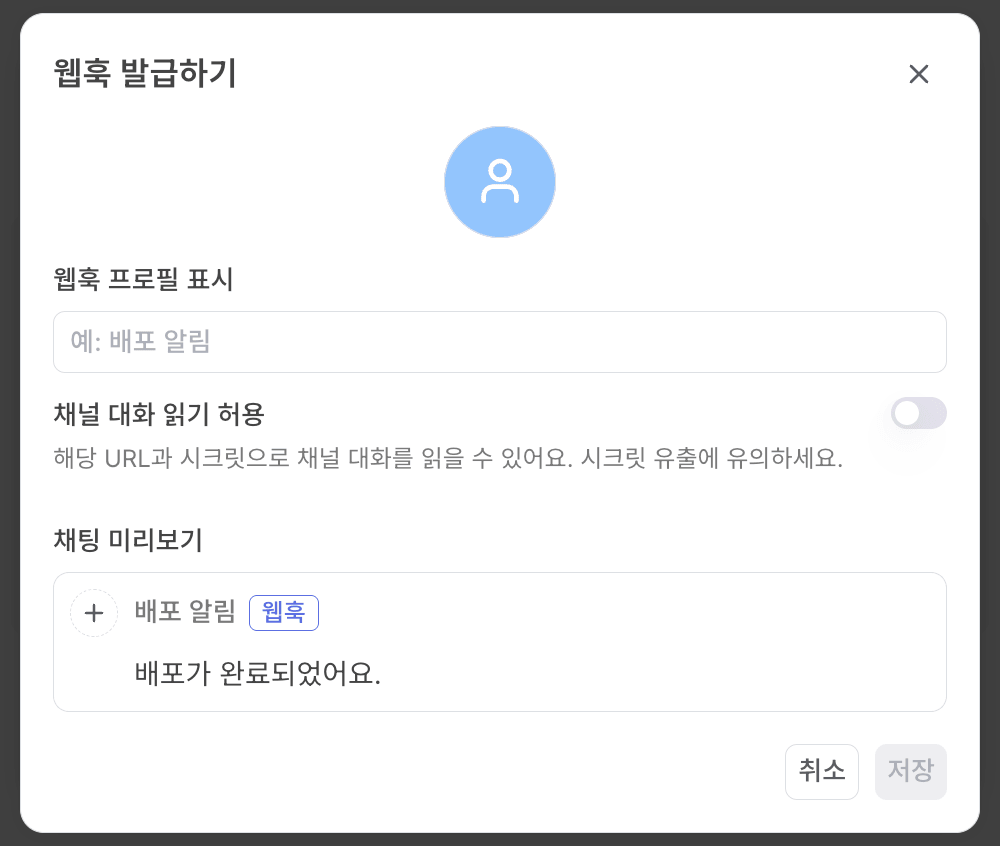
- Click Save. You get the URL, the secret, and a ready-to-paste curl command (Send a test request).
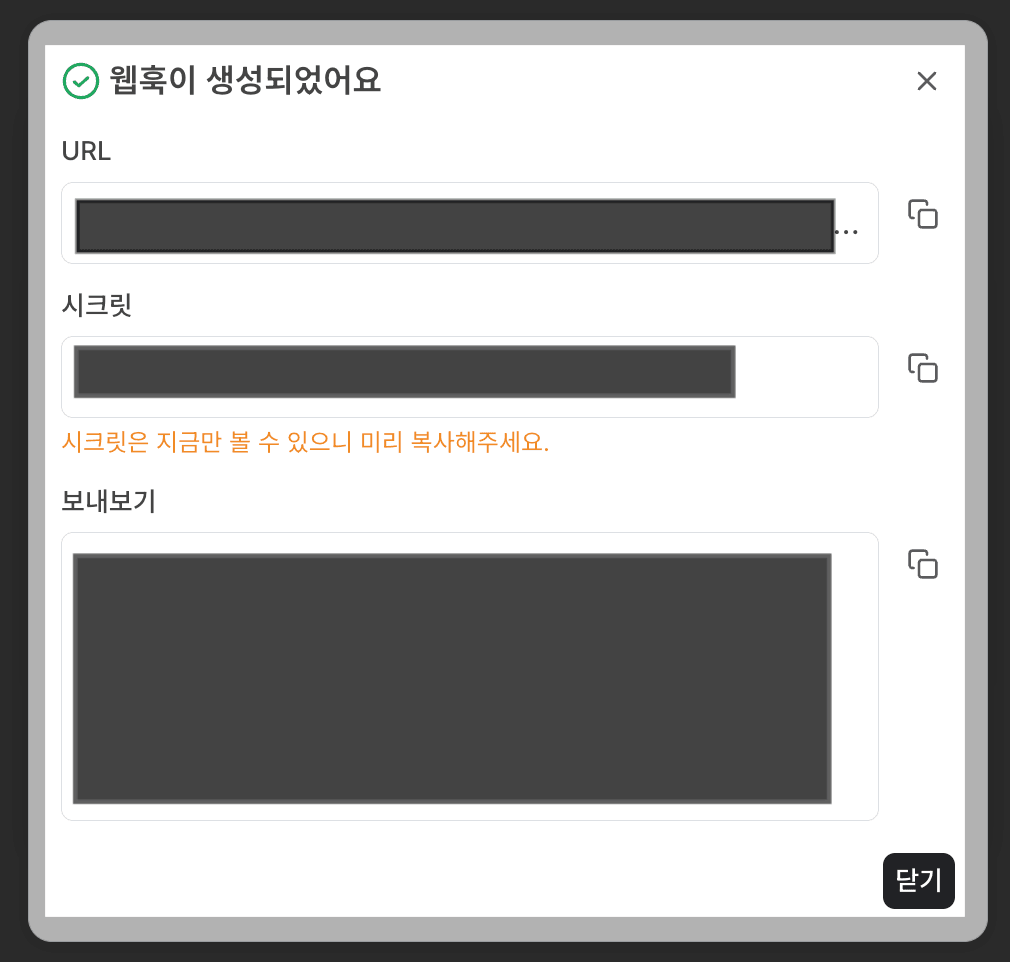
When creation finishes you receive two values.
| Value | Shape | Description |
|---|---|---|
| URL | https://collabops.ai/api/v2/integration/webhook/<token> | Where you send messages. The token in the path decides which channel the message goes to. |
| Secret | String | Sent in the Authorization: Bearer <secret> header. Shown only once, right after creation. |
The URL and the secret are two different values, and both are secrets. Do not commit them to a repository; store each one in your CI secret store. The secret cannot be shown again, so if you lose it, delete the webhook and create a new one. Deleting a webhook invalidates its URL immediately.
On a self-hosted installation, your server address takes the place of https://collabops.ai. Use the URL exactly as shown on the creation screen.
Turn on, turn off, rename, delete
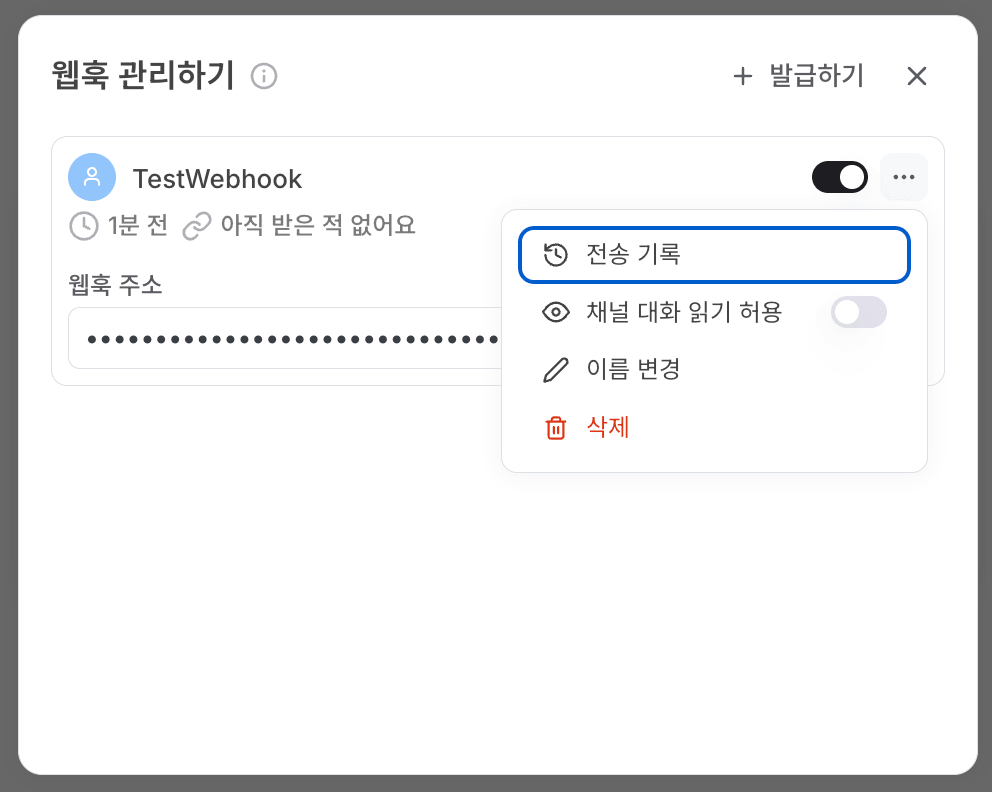
Each card in Manage webhooks has an on/off switch and a ⋯ menu. The ⋯ menu offers Delivery history, Allow reading channel messages, Rename and Delete. Any channel member can view the delivery history. Only channel admins can change the rest.
| Action | Result |
|---|---|
| Turn off | The URL and secret stay the same. Requests that arrive while it is off are rejected with 401. Turn it back on to receive at the same URL. |
| Delete | Cannot be undone. The URL stops working immediately and later requests get 404. |
| Channel deleted | The webhook is turned off automatically. Later requests get 401. |
Request format
| Item | Value | Required |
|---|---|---|
| Method | POST | Yes |
Authorization header | Bearer <secret> | Yes |
Content-Type header | application/json | Recommended |
Idempotency-Key header | A string of up to 200 characters. Posts only once even if the request is retried (see Preventing duplicates) | No |
| Body | A JSON object, up to 64 KiB | Yes |
curl -X POST "https://collabops.ai/api/v2/integration/webhook/<token>" \
  -H "Authorization: Bearer <secret>" \
  -H "Content-Type: application/json" \
  -d '{"text": "**Deployed** `web` 0.4.2"}'
Body — text and blocks
The body uses exactly one of two forms. Sending both text and blocks, or neither, returns 422.
| Form | When to use | Accepted fields |
|---|---|---|
text | Most notifications, when Markdown is enough | text · title · parent_delivery_id |
blocks | When you need something Markdown cannot express, such as text color, toggles, or sprint references | blocks · parent_delivery_id |
The text form
| Field | Type | Required | Description |
|---|---|---|---|
text | string | Yes | Markdown. Tokens turn into issue chips and date chips. |
title | string | No | Used only for the last-message preview in the channel list and for notifications; it does not appear in the message body. Derived from the body when omitted. |
parent_delivery_id | Positive integer | No | The delivery_id of the message to reply to (see Threads). |
The blocks form
| Field | Type | Required | Description |
|---|---|---|---|
blocks | array | Yes | An array of blocks. Each block needs an id and a type. |
parent_delivery_id | Positive integer | No | Same as in the text form. |
Block types and their shapes are in the Message Format Reference.
Fields not listed above are rejected. Adding title to the blocks form, or extra fields such as status, is not ignored; it returns 422. Silently dropping a field would leave the sender with no way to tell why it never shows up.
Response
Once the request is accepted, the webhook answers 202 Accepted right away without waiting for the post. Posting to the channel happens asynchronously afterwards.
{"delivery_id": 1234, "deduped": false}| Field | Description |
|---|---|
delivery_id | The delivery record number for this request. Use it as parent_delivery_id to continue a thread. |
deduped | true if a request with the same Idempotency-Key was already received. delivery_id is then the number of the first record. |
202 means the request was received, not that it has been posted. Check the outcome in Delivery history, described in Checking delivery results below.
Error responses
On failure you get JSON shaped like the following. error.title holds the reason, and error.request_id is the trace ID to quote when asking for support. The same trace ID is also sent in the X-Request-Id response header.
{
  "error": {
    "code": "VALIDATION_ERROR",
    "title": "요청 형식이 올바르지 않습니다: exactly one of text or blocks is required",
    "request_id": "3f1c9a52-8e0b-4c1d-9f7a-2b6e4d8c1a90",
    "upstream_status": 422
  }
}| Status | When | What to do |
|---|---|---|
| 401 | The secret is wrong, the Authorization header is missing, or the webhook is turned off (including when it was turned off automatically because the channel was deleted) | Fix the secret or turn the webhook on, then send again. |
| 404 | No webhook matches the token in the URL (including deleted webhooks) | Send to a newly created URL. |
| 413 | The whole request exceeds 1 MiB | Shrink the body. |
| 422 | The body is not JSON, a field is wrong, a limit is exceeded, or parent_delivery_id cannot be used | Fix the body as error.title says. Resending it unchanged returns 422 again. |
| 429 | More than 60 requests per minute to one webhook | Wait the number of seconds in the Retry-After header, then send. |
| 503 · 502 · 504 | A temporary internal error or a slow response | Send the same request again after a short wait. With an Idempotency-Key it will not be posted twice. |
Limits
| What | Limit | When exceeded |
|---|---|---|
| Body size | 64 KiB (65,536 bytes, counted on the raw body) | 422 |
| Whole request size | 1 MiB | 413 |
| Block count | 200 | 422 |
| Request rate | 60 per minute per webhook | 429 |
Idempotency-Key length | 200 characters | 422 |
Blocks are counted after conversion. For the text form, that is the count after the Markdown is turned into blocks. Each paragraph, heading, and list item is one block, and each table cell is one block, so a 3-column, 10-row table alone is 30 blocks. A body that produces no blocks at all, such as whitespace-only text, is also rejected with 422.
Split long reports into a thread rather than packing them into one message.
Preventing duplicates
When a network error swallows the response, the sending tool ends up retrying the same request. Put a value unique to each notification in the Idempotency-Key header and the message is posted only once, however many times it arrives with that key. The repeat response returns deduped: true and the first delivery_id.
Without a key, every request becomes a new message. Build the key so the same notification always yields the same value, for example deploy-3f9c2a71-success from the commit SHA and the event type. Rejected requests such as 401 or 422 do not claim the key, so after fixing the body you can resend with the same key and it is processed normally.
Threads
Put the delivery_id from a response into the next request's parent_delivery_id and the new message is posted as a reply to it. You do not need to know internal chat message IDs.
| Parent state | Result |
|---|---|
| Posted to the channel | Attached as a reply. |
| Still being posted | Waits until the parent is posted, then attaches. The response is 202. |
| The parent is itself a reply | Attached to the thread the parent belongs to. Replies to replies are not created. |
| Failed to post | This message is not posted either. The response is 202 and it is recorded in the delivery history. |
| Belongs to another webhook, or does not exist | 422 |
| Was rejected on receipt | 422 |
Checking delivery results
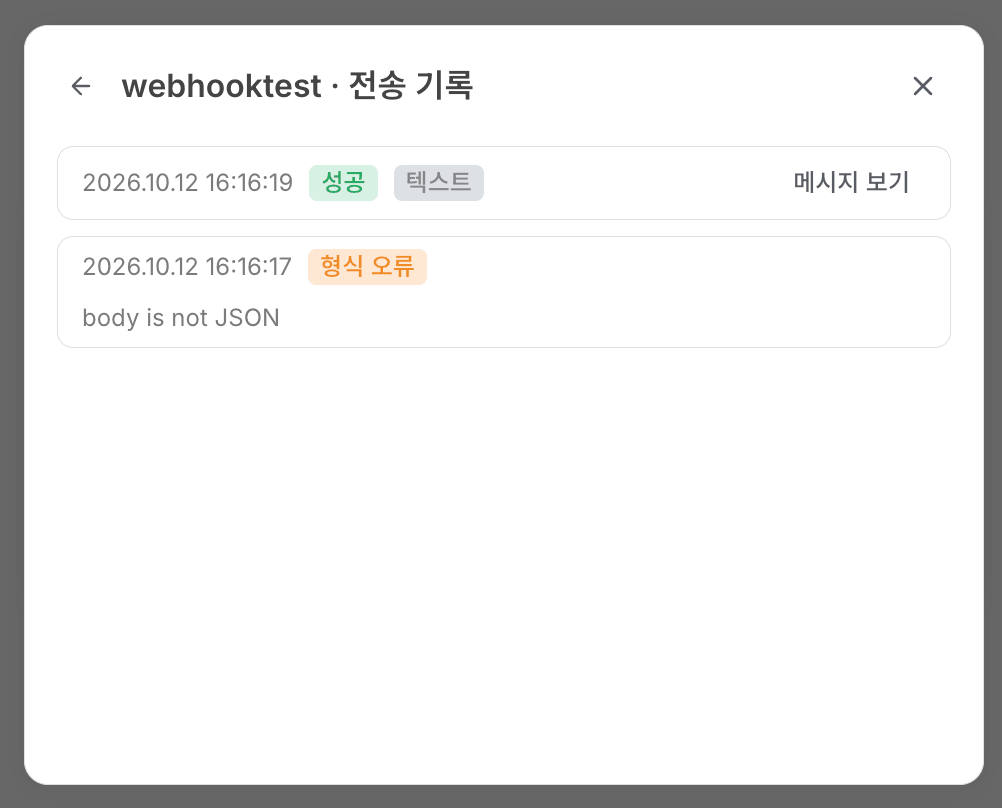
Each card in Manage webhooks shows the Last delivery status, and Delivery history in the ⋯ menu lists every request, newest first. Each entry shows when it arrived, its status, the body format (Text or Blocks) and whether it was a thread reply. Posted entries have View message, which opens that message in the channel. Rejected entries show the same English reason that follows the colon in error.title, and entries that failed body validation have Show payload so you can see the JSON that was sent.
| Shown as | Status value | Meaning |
|---|---|---|
| Accepted | accepted | Received, not posted yet. |
| Delivered | ok | Posted to the channel. |
| Waiting for parent | waiting_parent | A reply waiting for its parent message to be posted. |
| Parent failed | parent_failed | The parent failed to post, so this reply was not posted either. Send it again as a new request. |
| Chat delivery failed | chat_error | Posting failed. |
| Channel gone | channel_gone | The channel no longer exists. The webhook is turned off automatically. |
| Unauthorized | unauthorized | Rejected with 401. |
| Rate limited | rate_limited | Rejected with 429. Only the first request over the limit in each minute is recorded. |
| Invalid payload | invalid_payload | Rejected with 422. |
| Too large | too_large | Rejected with 422 because the body exceeded 64 KiB or 200 blocks. The body is not kept. |
A 404 for an unknown webhook, a 413 for requests over 1 MiB and temporary 5xx errors are not recorded, so check the response code in the sender's logs.